Content Briefs
Use MetaMonster's content briefs to plan a page before you write. See what ranks for your keyword, whether you can win it, a unique angle only you can take, and an outline you can accept, reject, or revise section by section.
A content brief is the research you’d want before writing a single word: what ranks for your keyword today, whether your site can realistically compete, and a structure to write against. In MetaMonster, every page has a Brief tab, and the brief is built from the live SERP rather than a generic template.
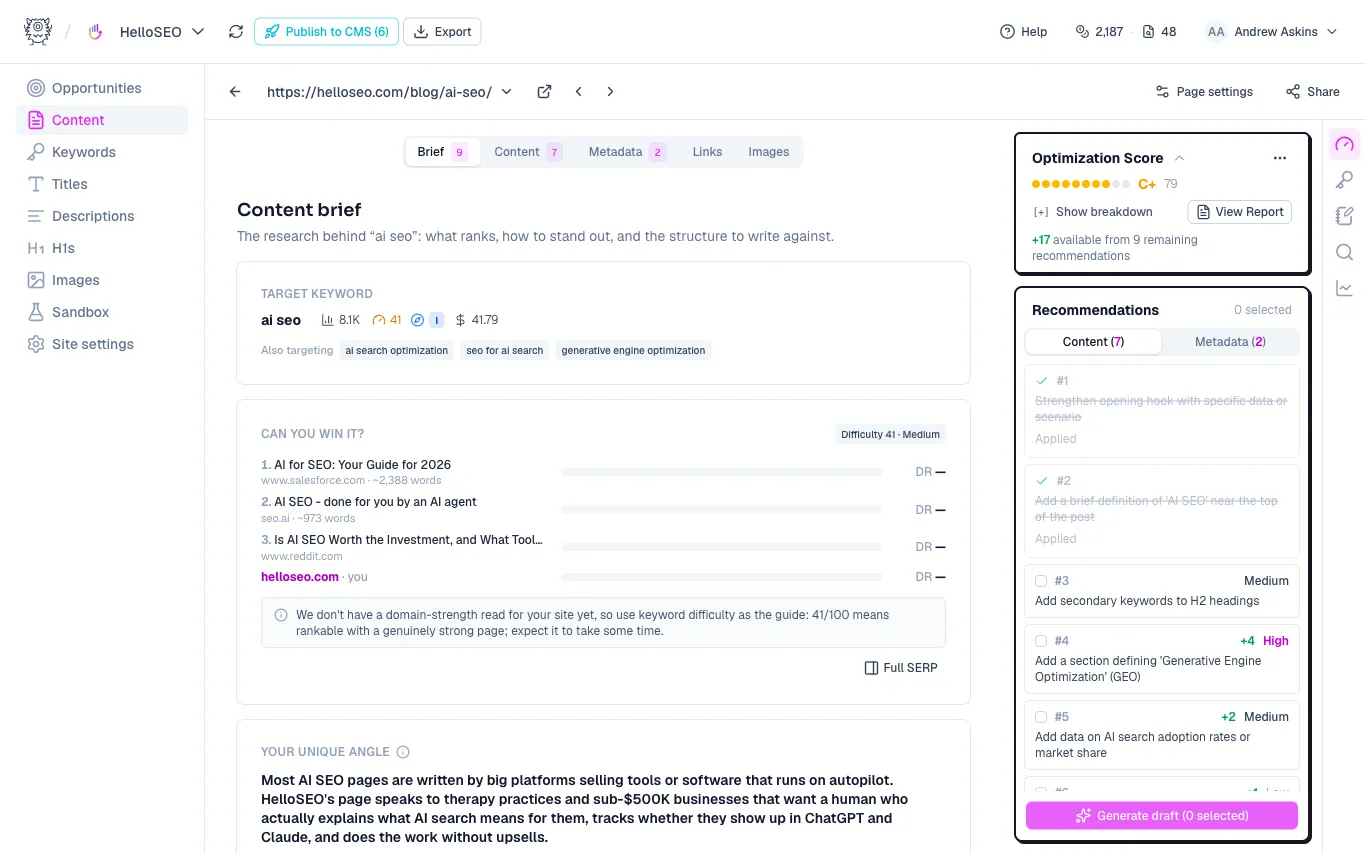
What’s in a brief
Target keyword. The page’s primary keyword with its volume, difficulty, intent, and cost per click, plus the secondary keywords you’re also targeting. If the keyword is wrong, fix it in the Keywords panel first; the brief is only as good as the keyword it’s built for.
Can you win it? The pages currently ranking, each with its domain rating next to yours. This is the honest check most briefs skip. If the ranking sites have much stronger domains, the brief says so, and the way to win becomes relevance: covering the topic more completely and more specifically than they do. Click Full SERP to see the complete results.
Your unique angle. The most valuable part of the brief. Based on the SERP and your business context, MetaMonster proposes what only you can add: the perspective, audience, or first-hand experience the ranking pages are missing. Information gain is one of the strongest modern ranking factors, and this section is where it comes from. The angle includes questions that surface your own experience, the things a writer can’t Google.
The outline. A proposed section-by-section structure for the page, built to cover what the SERP rewards while leaving room for the angle above.
Reviewing the outline
The outline isn’t take-it-or-leave-it. For each section you can:
- Accept it as proposed
- Reject it if it doesn’t fit
- Revise it with instructions, like “make this about pricing for agencies, not freelancers”
When you regenerate, rejected sections stay rejected. We won’t re-propose them. That makes the outline safe to iterate on: throw out what doesn’t fit and regenerate the rest. The Regenerate brief button rebuilds the whole thing if the page’s direction has changed.
Sharpening the brief
Under the Keywords panel you can add page context: a sentence about what this specific page is for. It sharpens both the keyword suggestions and the outline. “Comparison page for agencies choosing between us and OttoSEO” produces a very different brief than no context at all.
Where briefs fit
Briefs work for pages that already exist (plan a rewrite against what’s actually ranking) and for pages that don’t exist yet, including pages from the Site Planner. Once the brief looks right, write the content yourself or draft it in the editor, then run an analysis to grade the result. The Content Optimization guide picks up from there.
Need more help?
Can't find what you're looking for? Email us at support@metamonster.ai or chat with our team.