The Opportunities Dashboard
Understand the Opportunities dashboard, the landing page for every site. See the search demand behind your pages, how the opportunity score is calculated, and how to share a read-only report with clients.
When you open a site, you land on Opportunities. It answers the question every SEO project starts with: which pages are worth your time? Instead of a wall of metrics, you get your pages ranked by how much search demand is sitting behind them.
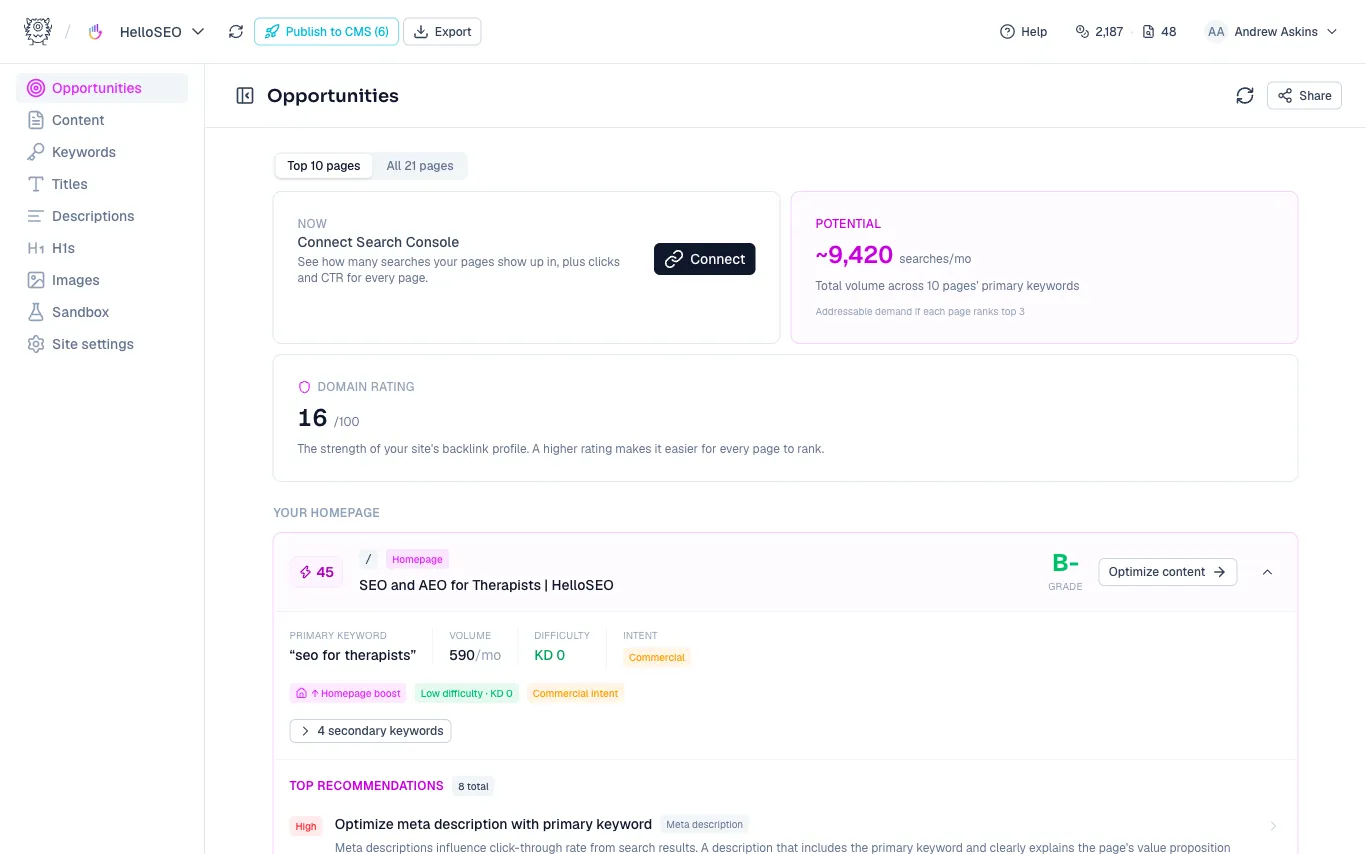
The summary cards
At the top of the dashboard:
- Potential - the total monthly search volume across your pages’ primary keywords. It’s the addressable demand if each of those pages ranked in the top 3. Treat it as a ceiling rather than a forecast.
- Domain rating - the strength of your site’s backlink profile, out of 100. A higher rating makes it easier for every page to rank, which is worth knowing before you judge any keyword as “too hard.”
- Connect Search Console - if you haven’t connected yet, this card prompts you to. With Search Console connected, the dashboard can factor in your real impressions and positions.
Use the tabs to switch between your top 10 pages and every page on the site.
How the opportunity score works
Each page gets an opportunity score from 0 to 100, built from demand signals:
- Search volume for the primary keyword
- Ease - how winnable the keyword is, based on its difficulty
- Intent - commercial and transactional queries score higher than informational ones
- Quick wins - pages already sitting just off page 1, where a small push moves real traffic (requires Search Console)
The score is deliberately independent of the page’s content grade. A page can be your biggest opportunity before it’s ever been analyzed, and that’s exactly when you want to know about it. The pills on each card explain why a page scored the way it did, so you’re never staring at a bare number.
Page cards
Every card shows the page’s opportunity score, its grade (or an Analyze page button if it hasn’t been graded yet), the primary keyword with volume, difficulty, and intent, its secondary keywords, and the top recommendations from its last analysis. Click Optimize content to jump straight into the editor.
A practical rhythm: open Opportunities, pick the highest-scoring page that isn’t optimized yet, and work through it. Repeat.
Sharing with a client
Click Share in the top right to create a read-only link to the dashboard. Send it to a client to show them where the upside is before you start, or to a prospect as part of a pitch. You can copy the link anytime and revoke it when you’re done.
Need more help?
Can't find what you're looking for? Email us at support@metamonster.ai or chat with our team.